
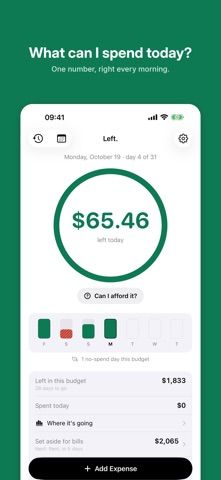
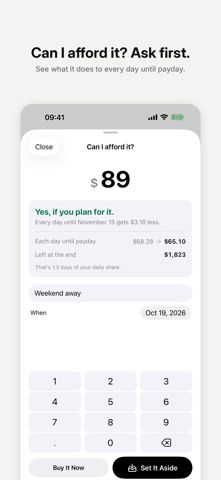
Left is a daily spending planner for people who want a practical number to guide everyday purchases. Enter the amount available and how long it needs to last; the app divides it across the remaining days and adjusts future amounts as spending changes. A purchase check estimates how a planned expense affects the days before payday, while a paycheck plan can account for income, bills, and savings. The listing also describes quick expense logging, widgets, Apple Watch support, budget history, and CSV import. After a 14-day period, the daily number, logging, and current budget remain free. One payment unlocks the additional planning and insight features; the developer says it is not a subscription. Left does not connect to banks, so entries are manual.

Left: Daily Budget Planner
A daily budget planner that turns the money left until payday into a clear amount you can spend today.
Overview
A closer look at Left: Daily Budget Planner.
A closer look
App screenshots
Choose with confidence
The useful details.
What it does
- Calculate a daily spending amount from available money and time until payday
- Preview how a proposed purchase changes upcoming daily budgets
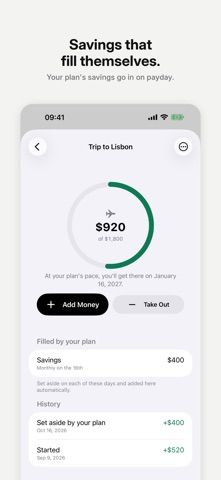
- Plan paydays, bills, and savings goals
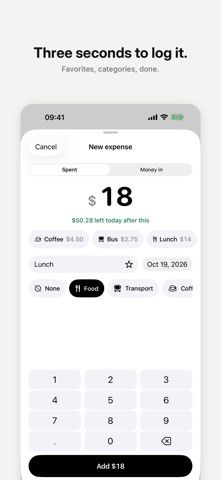
- Log expenses manually and import spending from CSV
A good fit for
- People who want a daily spending limit instead of a monthly category spreadsheet
- Users who prefer manual budgeting without connecting a bank account
Worth knowing
- Expense data is entered manually; paycheck planning, goals, purchase checks, widgets, and full history require a one-time payment after the 14-day period.
Frequently asked questions
Answers based on the app’s official listing and reviewed information.
What is Left: Daily Budget Planner used for?
A daily budget planner that turns the money left until payday into a clear amount you can spend today.
What can you do with Left: Daily Budget Planner?
Calculate a daily spending amount from available money and time until payday Preview how a proposed purchase changes upcoming daily budgets Plan paydays, bills, and savings goals Log expenses manually and import spending from CSV
Who is Left: Daily Budget Planner designed for?
People who want a daily spending limit instead of a monthly category spreadsheet Users who prefer manual budgeting without connecting a bank account
What should you know before downloading Left: Daily Budget Planner?
Expense data is entered manually; paycheck planning, goals, purchase checks, widgets, and full history require a one-time payment after the 14-day period.
Does Left: Daily Budget Planner include paid features?
The daily number, logging, and current budget remain free after the first 14 days. One payment unlocks paycheck plans, goals, purchase checks, widgets and Apple Watch, insights, and full history; the developer says there is no subscription.
Which platforms support Left: Daily Budget Planner?
Greatooly's reviewed app information lists iOS.
Researched from official sources; this is not a hands-on review. Last checked 2026-11-04.
Keep exploring
More apps that might be a good fit.

Jars: Savings Goal Tracker
Jars tracks user-entered savings goals, deposits, and withdrawal plans without holding or moving money.

Coal - Gift List & Budget
Budget for gifts by recipient and track each purchase through delivery, wrapping, and returns.

Budget Planner App: Tally
A personal budget app with voice expense entry, automatic category suggestions, spending limits, and charts.