
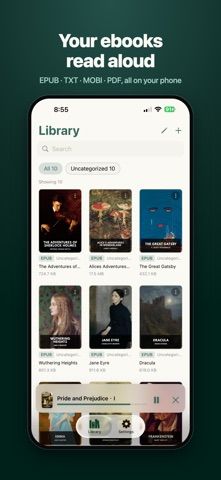
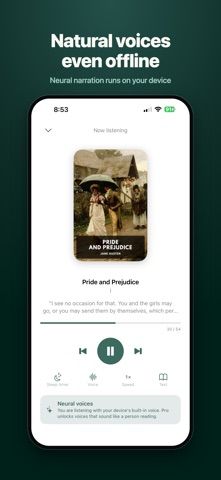
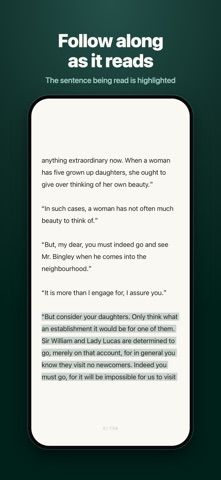
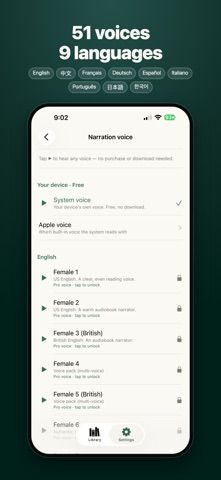
iRead turns a reader’s existing ebooks and documents into spoken audio. Open supported EPUB, PDF, or text files, choose a built-in system voice or natural neural narration, and follow highlighted words as the voice reads. Playback can continue in the background, and users can adjust voice and reading settings for longer listening sessions. The complete reader and system voice are free; a one-time Pro purchase unlocks natural neural voices. The developer says the app has no subscription, account requirement, ads, or tracking and works offline. iRead does not sell or provide books, so users must import files they already have and confirm that their formats and digital rights are compatible. Neural voices may require local storage for voice data, and pronunciation can vary with the source text. The US App Store description does not state the current one-time Pro price, so check the purchase sheet before upgrading.

iRead: Read Aloud EPUB Reader
An offline read-aloud app for personal EPUB, PDF, and text files with natural neural voices and synchronized highlighting.
Overview
A closer look at iRead: Read Aloud EPUB Reader.
A closer look
App screenshots
Choose with confidence
The useful details.
What it does
- Open personal EPUB, PDF, and text files for read-aloud playback.
- Follow synchronized text highlighting while listening.
- Use the device’s system voice free or unlock natural neural voices with Pro.
- Listen offline with background playback and adjustable reading controls.
A good fit for
- Readers who want to listen to their own books and documents without a subscription.
Worth knowing
- iRead does not provide books; users need compatible files and rights to use them. Natural neural voices require a one-time Pro purchase, but the current price is not stated in the verified listing text. Voice pronunciation depends on source formatting.
Frequently asked questions
Answers based on the app’s official listing and reviewed information.
What is iRead: Read Aloud EPUB Reader used for?
An offline read-aloud app for personal EPUB, PDF, and text files with natural neural voices and synchronized highlighting.
What can you do with iRead: Read Aloud EPUB Reader?
Open personal EPUB, PDF, and text files for read-aloud playback. Follow synchronized text highlighting while listening. Use the device’s system voice free or unlock natural neural voices with Pro. Listen offline with background playback and adjustable reading controls.
Who is iRead: Read Aloud EPUB Reader designed for?
Readers who want to listen to their own books and documents without a subscription.
What should you know before downloading iRead: Read Aloud EPUB Reader?
iRead does not provide books; users need compatible files and rights to use them. Natural neural voices require a one-time Pro purchase, but the current price is not stated in the verified listing text. Voice pronunciation depends on source formatting.
Does iRead: Read Aloud EPUB Reader include paid features?
The full reader with built-in system voices is free to use. A one-time Pro purchase unlocks natural neural voices; verify the current US price in the App Store.
Which platforms support iRead: Read Aloud EPUB Reader?
Greatooly's reviewed app information lists iOS.
Researched from official sources; this is not a hands-on review. Last checked 2026-11-04.
Keep exploring
More apps that might be a good fit.

Reading Log XL — Book Tracker
Reading Log XL records reading time, pages, goals and streaks, organizes a three-shelf book list, and exports school-friendly reading reports.

MyBookShelf: Reading Log
MyBookShelf is a private reading catalog for scanning, organizing and tracking books, notes, ratings and reading progress.

Siftivo: What to Read Next
Siftivo suggests books from a reader’s taste and combines daily picks with reading shelves, reviews, reader follows, and a journal.