
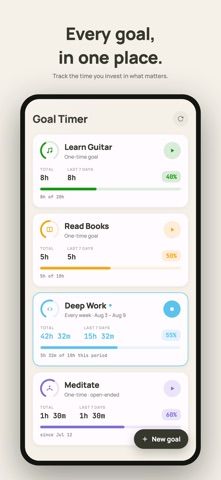
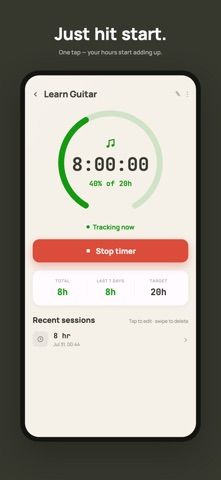
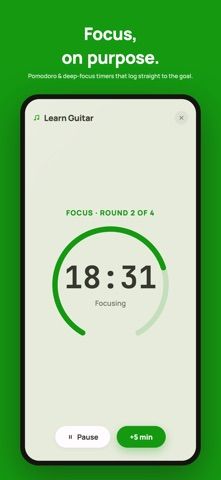
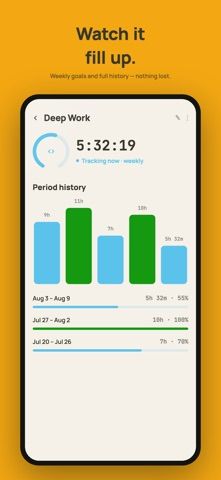
Goal Timer measures the hours someone invests in a skill, project, or personal goal rather than only counting completed checkboxes. Users create goals, optionally set targets, and start a timestamp-based timer when they begin a session. The app tracks totals, weekly progress, recurring daily or weekly goals, streaks, and a 26-week activity heatmap. A session history can be edited, and widgets can start or stop timers from the Home Screen. The free plan supports up to three goals and includes tracking, progress, history, insights, and streaks without ads. Goal Timer Pro adds unlimited goals, focus sessions, multiple concurrent timers, manual time entries, CSV export, more streak freezes, and iCloud sync. The US App Store lists Pro at $4.99 monthly or $24.99 annually. It requires iOS 15 or later and supports iPhone and iPad.
Goal Timer: Time Track Goals
Goal Timer tracks time spent on personal goals with active timers, recurring targets, histories, streaks and visual progress insights.
Overview
A closer look at Goal Timer: Time Track Goals.
A closer look
App screenshots
Choose with confidence
The useful details.
What it does
- Track hours toward one-time, daily, or weekly goals with a timestamp-based timer.
- Review weekly totals, recurring goal history, streaks, and a 26-week activity heatmap.
- Use Home Screen widgets to see progress or start and stop a timer.
- Unlock focus sessions, simultaneous timers, editable entries, CSV export, and iCloud sync with Pro.
A good fit for
- People who want to measure time spent practicing, studying, training, or working on projects.
- Users who prefer accumulating hours and reviewing trends over simple completion checkmarks.
Worth knowing
- Requires iOS 15 or later; the free plan is limited to three goals.
- Goal Timer Pro costs $4.99 monthly or $24.99 yearly in the US App Store. Focus mode, multiple timers, manual time edits, CSV export, and iCloud sync require Pro.
Frequently asked questions
Answers based on the app’s official listing and reviewed information.
What is Goal Timer: Time Track Goals used for?
Goal Timer tracks time spent on personal goals with active timers, recurring targets, histories, streaks and visual progress insights.
What can you do with Goal Timer: Time Track Goals?
Track hours toward one-time, daily, or weekly goals with a timestamp-based timer. Review weekly totals, recurring goal history, streaks, and a 26-week activity heatmap. Use Home Screen widgets to see progress or start and stop a timer. Unlock focus sessions, simultaneous timers, editable entries, CSV export, and iCloud sync with Pro.
Who is Goal Timer: Time Track Goals designed for?
People who want to measure time spent practicing, studying, training, or working on projects. Users who prefer accumulating hours and reviewing trends over simple completion checkmarks.
What should you know before downloading Goal Timer: Time Track Goals?
Requires iOS 15 or later; the free plan is limited to three goals. Goal Timer Pro costs $4.99 monthly or $24.99 yearly in the US App Store. Focus mode, multiple timers, manual time edits, CSV export, and iCloud sync require Pro.
What does Goal Timer: Time Track Goals cost?
Free download and no ads. The free plan supports up to three goals and includes timers, progress, history, insights, and streaks. Goal Timer Pro adds unlimited goals, focus sessions, multiple timers, editing and adding time entries, CSV export, unlimited streak freezes, and iCloud sync. US App Store pricing is $4.99 monthly or $24.99 annually.
Which platforms support Goal Timer: Time Track Goals?
Greatooly's reviewed app information lists iOS.
Researched from official sources; this is not a hands-on review. Last checked 2026-11-10.
Keep exploring
More apps that might be a good fit.

CleanHaus: Airbnb Turnovers
CleanHaus automates short-term rental turnovers by connecting booking calendars with cleaners, schedules and property tasks.

GoalStar: Daily Goal Tracker
GoalStar makes daily goals visible with a gold-star chart, streaks, reminders, widgets and optional NFC tap tags.

Accessbox - Password Manager
Accessbox stores passwords, passkeys and verification codes in encrypted Accesscards with AutoFill, breach alerts and optional iCloud sync.