
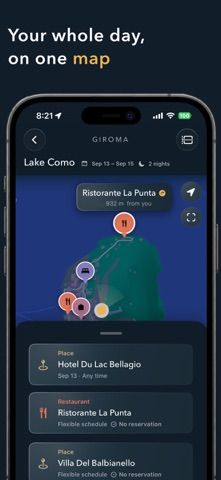
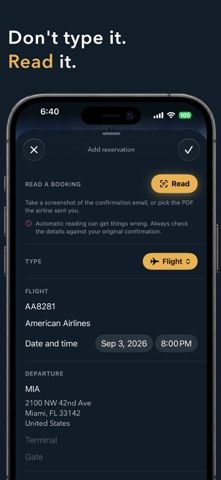
Giroma turns travel confirmations into a trip itinerary. Users can share a screenshot or PDF of a flight, hotel, or dinner booking with the app, which extracts dates, times, and confirmation details and places the activity on the correct day and city. Multi-city trips can be combined or split without deleting plans, and activities can be added to the iPhone calendar in their local time zone. Trips stay on the device, while shared itineraries use the user's own iCloud. Apple Intelligence can read booking images and PDFs on iPhone 15 Pro or newer with iOS 26; on other supported phones, users can add details manually or search. Giroma is free for iPhone with iOS 18 or later. The listing does not explain hotel or flight booking, so travelers still need to confirm reservations and schedule changes with providers.

Giroma: Trip & Travel Planner
A trip organizer that turns booking screenshots and PDFs into an itinerary, groups plans by city, and syncs shared trips through iCloud.
Overview
A closer look at Giroma: Trip & Travel Planner.
A closer look
App screenshots


Choose with confidence
The useful details.
What it does
- Extract dates, times, and confirmation details from booking screenshots or PDFs on compatible devices.
- Organize activities by trip and city, including multi-city itineraries.
- Add events to the iPhone calendar using the local time of each destination.
- Keep trips on-device and share them through the user's iCloud.
A good fit for
- Travelers who want to turn booking confirmations into a day-by-day itinerary.
Worth knowing
- Apple Intelligence extraction requires iPhone 15 Pro or newer with iOS 26; other phones can use manual entry or search.
- The listing describes itinerary organization, not booking or reservation changes.
- The developer says shared trips use iCloud, so collaborators need compatible Apple devices and access.
Frequently asked questions
Answers based on the app’s official listing and reviewed information.
What is Giroma: Trip & Travel Planner used for?
A trip organizer that turns booking screenshots and PDFs into an itinerary, groups plans by city, and syncs shared trips through iCloud.
What can you do with Giroma: Trip & Travel Planner?
Extract dates, times, and confirmation details from booking screenshots or PDFs on compatible devices. Organize activities by trip and city, including multi-city itineraries. Add events to the iPhone calendar using the local time of each destination. Keep trips on-device and share them through the user's iCloud.
Who is Giroma: Trip & Travel Planner designed for?
Travelers who want to turn booking confirmations into a day-by-day itinerary.
What should you know before downloading Giroma: Trip & Travel Planner?
Apple Intelligence extraction requires iPhone 15 Pro or newer with iOS 26; other phones can use manual entry or search. The listing describes itinerary organization, not booking or reservation changes. The developer says shared trips use iCloud, so collaborators need compatible Apple devices and access.
Does Giroma: Trip & Travel Planner include paid features?
The reviewed listing reports no in-app purchases.
Which platforms support Giroma: Trip & Travel Planner?
Greatooly's reviewed app information lists iOS.
Researched from official sources; this is not a hands-on review. Last checked 2026-11-04.
Keep exploring
More apps that might be a good fit.

Tripdrobe: Outfit Packing List
Plan outfits and packing lists by trip date, with premium weather, baggage, wardrobe, and group tools.

SkyFlight Tracker
A flight companion with live status, gate countdowns, route maps, layover risk alerts, airport weather, and travel statistics.

FLITx・Live Flight Tracker Map
A live flight map for searching aircraft and routes, checking flight status, and viewing nearby airport activity.