
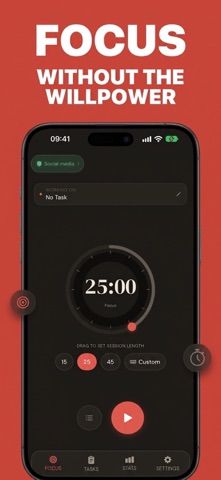
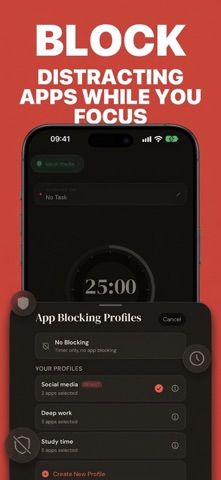
Focus Timer: Tomato Friend pairs a minimal Pomodoro timer with tools for planning and reviewing focus sessions. The developer describes it as designed with neurodivergent needs in mind, including support for people managing time blindness. The latest App Store version adds daily, weekly, monthly, and all-time statistics, a contribution heatmap, and a task list with durations, colors, icons, and reminders. Home Screen widgets show the day’s focus progress, while optional iCloud sync can keep sessions and settings aligned across devices. Pro features include blocking selected apps or categories, reusable blocking profiles, Strict Mode, and custom task presets. Website blocking is a separate setting and is off by default. The app is free to download; the US App Store lists Tomato Friend Pro at $2.99 monthly, $19.99 annually, or $44.99 for lifetime access. It requires iOS 17.6 or later and is listed for iPhone.

Focus Timer: Tomato Friend
Tomato Friend combines a Pomodoro timer with focus statistics, daily task planning, widgets and optional app blocking for iPhone.
Overview
A closer look at Focus Timer: Tomato Friend.
A closer look
App screenshots
Choose with confidence
The useful details.
What it does
- Use a Pomodoro timer with a simple interface intended to reduce distractions during focus blocks.
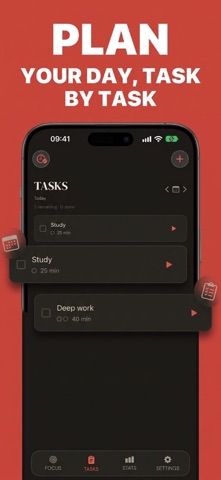
- Plan the day with tasks that include durations, colors, icons, and reminders.
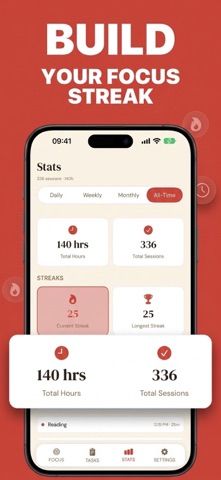
- Review session totals, streaks, focus goals, and a contribution heatmap across multiple time ranges.
- Use Home Screen widgets and optional iCloud sync; Pro adds app blocking, Strict Mode, and task presets.
A good fit for
- Students and professionals who want a focus timer paired with daily task planning and progress history.
- People looking for a minimal timer with optional distraction controls and iCloud sync.
Worth knowing
- Requires iOS 17.6 or later and is listed for iPhone; iCloud sync is optional and off by default.
- App blocking, Strict Mode, and custom task presets are Pro features. The US App Store lists Pro at $2.99 monthly, $19.99 annually, or $44.99 lifetime.
Frequently asked questions
Answers based on the app’s official listing and reviewed information.
What is Focus Timer: Tomato Friend used for?
Tomato Friend combines a Pomodoro timer with focus statistics, daily task planning, widgets and optional app blocking for iPhone.
What can you do with Focus Timer: Tomato Friend?
Use a Pomodoro timer with a simple interface intended to reduce distractions during focus blocks. Plan the day with tasks that include durations, colors, icons, and reminders. Review session totals, streaks, focus goals, and a contribution heatmap across multiple time ranges. Use Home Screen widgets and optional iCloud sync; Pro adds app blocking, Strict Mode, and task presets.
Who is Focus Timer: Tomato Friend designed for?
Students and professionals who want a focus timer paired with daily task planning and progress history. People looking for a minimal timer with optional distraction controls and iCloud sync.
What should you know before downloading Focus Timer: Tomato Friend?
Requires iOS 17.6 or later and is listed for iPhone; iCloud sync is optional and off by default. App blocking, Strict Mode, and custom task presets are Pro features. The US App Store lists Pro at $2.99 monthly, $19.99 annually, or $44.99 lifetime.
What does Focus Timer: Tomato Friend cost?
Free download with Pomodoro focus sessions and the listed timer, statistics, task-planning, and widget features; optional iCloud sync is off by default. Tomato Friend Pro is listed at $2.99 per month or $19.99 per year in the US App Store; Pro includes app and category blocking, Strict Mode, and custom task presets. The US App Store lists a $44.99 lifetime purchase for Tomato Friend Pro.
Which platforms support Focus Timer: Tomato Friend?
Greatooly's reviewed app information lists iOS.
Researched from official sources; this is not a hands-on review. Last checked 2026-11-10.
Keep exploring
More apps that might be a good fit.

CleanHaus: Airbnb Turnovers
CleanHaus automates short-term rental turnovers by connecting booking calendars with cleaners, schedules and property tasks.

GoalStar: Daily Goal Tracker
GoalStar makes daily goals visible with a gold-star chart, streaks, reminders, widgets and optional NFC tap tags.

Accessbox - Password Manager
Accessbox stores passwords, passkeys and verification codes in encrypted Accesscards with AutoFill, breach alerts and optional iCloud sync.