
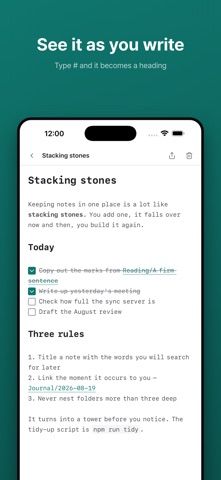
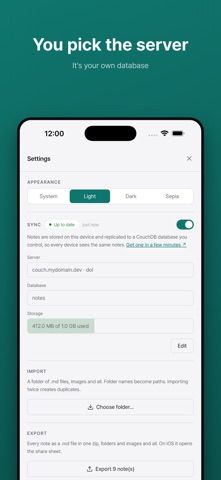
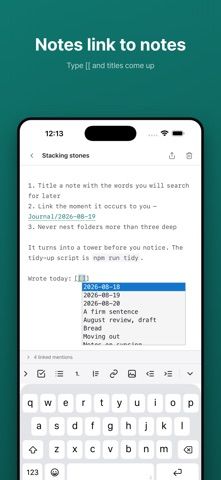
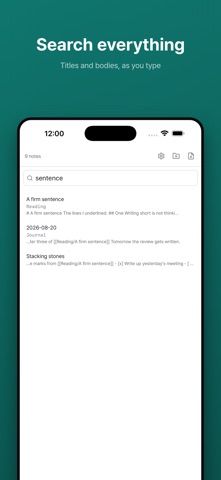
dol is a Markdown notes app for people who want to keep their notes in portable files and choose where synchronization happens. The editor offers a live preview, wikilink completion, backlinks, search across titles and note bodies, find-and-replace, nested folders, and image attachments. Sync is optional: without it, notes stay on the device and can be used offline. When enabled, notes sync through a CouchDB server the user selects, including a self-hosted or hosted server, rather than a dol-operated service. Users can import an existing folder of Markdown files and export notes and images together as a ZIP. The App Store listing shows a free download and no in-app purchases. It requires iOS 15 or later and also lists iPad and Apple silicon Mac compatibility, with macOS 12 or later required for Mac.

dol - Markdown Notes
dol is an offline-first Markdown notes editor with wikilinks, backlinks, nested folders, image attachments and optional user-chosen CouchDB sync.
Overview
A closer look at dol - Markdown Notes.
A closer look
App screenshots
Choose with confidence
The useful details.
What it does
- Write Markdown with live preview, wikilink autocomplete, backlinks, and search.
- Organize notes in nested folders and attach images; use find-and-replace within a note.
- Import a Markdown folder or export notes and images together in a ZIP archive.
- Keep notes local for offline use or configure sync through a CouchDB server you choose.
A good fit for
- Markdown users who want portable notes instead of a proprietary cloud notebook.
- People who want to self-host or choose a CouchDB provider for optional sync across devices.
Worth knowing
- Requires iOS 15 or later; the Mac version requires an Apple silicon Mac running macOS 12 or later.
- Sync is optional and requires the user to configure a CouchDB server; without that setup, notes do not automatically sync between devices.
Frequently asked questions
Answers based on the app’s official listing and reviewed information.
What is dol - Markdown Notes used for?
dol is an offline-first Markdown notes editor with wikilinks, backlinks, nested folders, image attachments and optional user-chosen CouchDB sync.
What can you do with dol - Markdown Notes?
Write Markdown with live preview, wikilink autocomplete, backlinks, and search. Organize notes in nested folders and attach images; use find-and-replace within a note. Import a Markdown folder or export notes and images together in a ZIP archive. Keep notes local for offline use or configure sync through a CouchDB server you choose.
Who is dol - Markdown Notes designed for?
Markdown users who want portable notes instead of a proprietary cloud notebook. People who want to self-host or choose a CouchDB provider for optional sync across devices.
What should you know before downloading dol - Markdown Notes?
Requires iOS 15 or later; the Mac version requires an Apple silicon Mac running macOS 12 or later. Sync is optional and requires the user to configure a CouchDB server; without that setup, notes do not automatically sync between devices.
What does dol - Markdown Notes cost?
Free to download. The US App Store lists dol as free to download with no in-app purchases.
Which platforms support dol - Markdown Notes?
Greatooly's reviewed app information lists iOS, macOS.
Researched from official sources; this is not a hands-on review. Last checked 2026-11-10.
Keep exploring
More apps that might be a good fit.

CleanHaus: Airbnb Turnovers
CleanHaus automates short-term rental turnovers by connecting booking calendars with cleaners, schedules and property tasks.

GoalStar: Daily Goal Tracker
GoalStar makes daily goals visible with a gold-star chart, streaks, reminders, widgets and optional NFC tap tags.

Accessbox - Password Manager
Accessbox stores passwords, passkeys and verification codes in encrypted Accesscards with AutoFill, breach alerts and optional iCloud sync.