GreatoolyGreatooly
Debit & Credit app icon

Debit & Credit

Track spending, budgets, and transactions across accounts, with Apple financial integrations and optional premium features.

By Ivan Pavlov Pty LtdApp Store rating 4.8 (2,417)Official store informationPublished 2026/11/03Checked 2026-11-03

Overview

A closer look at Debit & Credit.

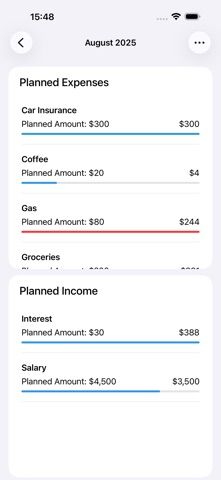
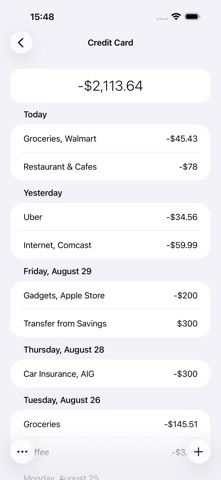
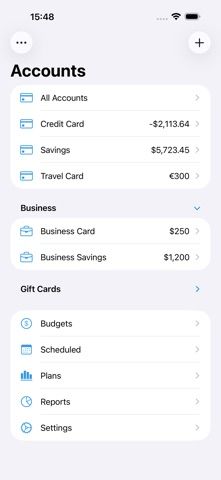
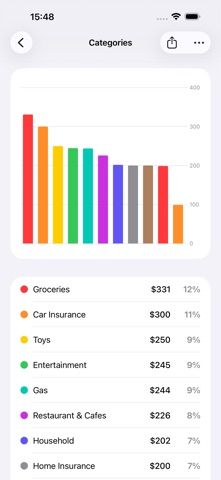
Debit & Credit is a personal finance app for keeping account records and transactions together. Users can create transactions, set budgets, schedule recurring entries, and organize spending. The listing describes automatic transaction import for Apple Card, Apple Cash, and Apple Savings, plus rules for categorizing transactions. Other tools include payee locations, reports, and a macOS companion app.

Some features require Premium, which the listing describes as an annual subscription. Sync with the Mac app uses iCloud, and availability depends on the supported Apple services and device setup. The app is a record-keeping tool; it does not replace the official statements or account portals of financial institutions.

Imported transactions and category rules can be incomplete or misclassified. Reconcile balances with official statements before making payment or tax decisions. Review which account data is imported and how it is stored. We have not tested Apple account connections, categorization, or reports. Check Premium pricing and supported financial services before subscribing.
A closer look

App screenshots

Debit & Credit official iOS screenshot 1Debit & Credit official iOS screenshot 2Official iOS store screenshotOfficial iOS store screenshot

Choose with confidence

The useful details.

What it does

  • Track transactions and budgets across personal accounts
  • Import listed Apple Card, Apple Cash, and Apple Savings transactions
  • Use rules to categorize transactions and record recurring entries
  • Review reports and sync with the Mac version through iCloud

A good fit for

  • Apple users who want a personal finance ledger with supported Apple account imports

Worth knowing

  • Transaction imports and categories can be incomplete; reconcile with official statements.
  • Apple account integrations and some features depend on supported services and settings.
  • Premium is an annual subscription; confirm current price and feature limits.

Frequently asked questions

Answers based on the app’s official listing and reviewed information.

What is Debit & Credit used for?

Track spending, budgets, and transactions across accounts, with Apple financial integrations and optional premium features.

What can you do with Debit & Credit?

Track transactions and budgets across personal accounts Import listed Apple Card, Apple Cash, and Apple Savings transactions Use rules to categorize transactions and record recurring entries Review reports and sync with the Mac version through iCloud

Who is Debit & Credit designed for?

Apple users who want a personal finance ledger with supported Apple account imports

What should you know before downloading Debit & Credit?

Transaction imports and categories can be incomplete; reconcile with official statements. Apple account integrations and some features depend on supported services and settings. Premium is an annual subscription; confirm current price and feature limits.

Does Debit & Credit include paid features?

Some features require the annual Premium subscription. Current price and included features should be checked in the App Store.

Which platforms support Debit & Credit?

Greatooly's reviewed app information lists iOS.

Researched from official sources; this is not a hands-on review. Last checked 2026-11-03.

Keep exploring

More apps that might be a good fit.

Budget Planner App: Tally

A personal budget app with voice expense entry, automatic category suggestions, spending limits, and charts.