
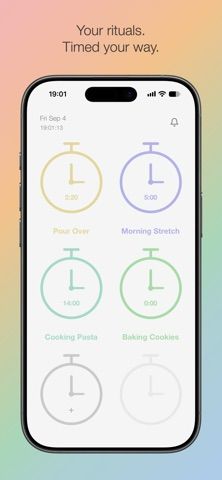
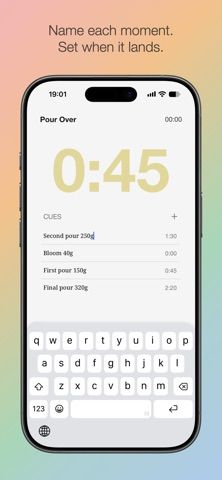
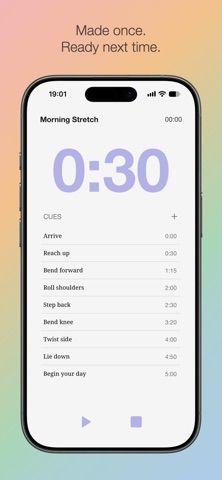
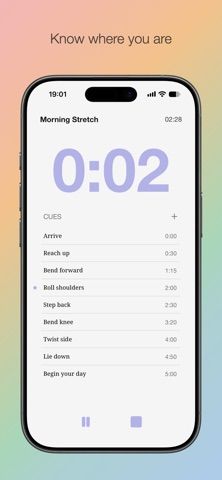
CUEit is a routine timer for repeated activities that need cues at specific moments. Create a slot for a coffee recipe, workout, cooking sequence, practice session, or another routine, then add titled cues at exact times. During a session, a large countdown shows the next cue while the full sequence and elapsed time stay visible. The app stores routines locally and works offline without an account, login, or ads. An optional sound alert plays when each cue arrives through CUEit Access. CUEit is free to download; its US App Store lists Access at $3.99 per month or $34.99 per year. It is designed for iPhone and requires iOS 15 or later. The app does not sync routines to the cloud, so they remain on the device where they were created.

CUEit: Routine Timer
CUEit builds reusable routines from timed cues, so users can follow a sequence without continually watching a timer.
By Seunghoon BaekReleased 2026/09/08App Store rating 5.0 (1)Official store informationPublished 2026/11/10Checked 2026-11-10
Overview
A closer look at CUEit: Routine Timer.
A closer look
App screenshots
Choose with confidence
The useful details.
What it does
- Create reusable timed sequences with named cues for cooking, exercise, practice, or daily routines.
- Follow a large countdown to the next cue while viewing the full sequence and elapsed time.
- Store routines on the device and use the timer offline without an account or login.
- Enable sound alerts for cue times with the optional CUEit Access subscription.
A good fit for
- People who repeat multi-step activities and want prompts without staring at a timer.
- Users who prefer a minimal, offline routine timer with locally stored sequences.
Worth knowing
- The app is designed for iPhone; the listing does not describe iPad or Android support.
- Routines do not sync to the cloud, so there is no listed cross-device backup or sharing.
- Sound alerts require CUEit Access, listed at $3.99 monthly or $34.99 yearly.
Frequently asked questions
Answers based on the app’s official listing and reviewed information.
What is CUEit: Routine Timer used for?
CUEit builds reusable routines from timed cues, so users can follow a sequence without continually watching a timer.
What can you do with CUEit: Routine Timer?
Create reusable timed sequences with named cues for cooking, exercise, practice, or daily routines. Follow a large countdown to the next cue while viewing the full sequence and elapsed time. Store routines on the device and use the timer offline without an account or login. Enable sound alerts for cue times with the optional CUEit Access subscription.
Who is CUEit: Routine Timer designed for?
People who repeat multi-step activities and want prompts without staring at a timer. Users who prefer a minimal, offline routine timer with locally stored sequences.
What should you know before downloading CUEit: Routine Timer?
The app is designed for iPhone; the listing does not describe iPad or Android support. Routines do not sync to the cloud, so there is no listed cross-device backup or sharing. Sound alerts require CUEit Access, listed at $3.99 monthly or $34.99 yearly.
What does CUEit: Routine Timer cost?
Free download includes local routine slots, timed cues, countdown, and elapsed-time display. CUEit Access unlocks sound alerts at each cue. The US App Store lists $3.99 monthly or $34.99 yearly.
Which platforms support CUEit: Routine Timer?
Greatooly's reviewed app information lists iOS.
Researched from official sources; this is not a hands-on review. Last checked 2026-11-10.
Keep exploring
More apps that might be a good fit.

CleanHaus: Airbnb Turnovers
CleanHaus automates short-term rental turnovers by connecting booking calendars with cleaners, schedules and property tasks.

GoalStar: Daily Goal Tracker
GoalStar makes daily goals visible with a gold-star chart, streaks, reminders, widgets and optional NFC tap tags.

Accessbox - Password Manager
Accessbox stores passwords, passkeys and verification codes in encrypted Accesscards with AutoFill, breach alerts and optional iCloud sync.