
Cinemate gives movie and television fans a private place to record what they have watched and what they want to see next. Browse weekly trending titles or search the catalog, then save a title to a watchlist, mark it watched, rate it, and add a personal note. Show pages include cast, trailers, episode summaries, air dates, and where a title is available to stream. The library can be sorted by status or rating, and franchise lists place films in release order. Widgets, a news feed, and release-day reminders help keep upcoming titles visible. Data syncs through the user’s own iCloud account without a separate account or developer-hosted server. Cinemate is free, with no ads or in-app purchases, and requires iOS 18 or later.

Cinemate Movie Tracker
Cinemate is a personal watch diary for movies and TV, with ratings, watchlists, streaming availability and release reminders.
By Kanan SultanovReleased 2026/08/26No ratings yetOfficial store informationPublished 2026/11/10Checked 2026-11-10
Overview
A closer look at Cinemate Movie Tracker.
A closer look
App screenshots
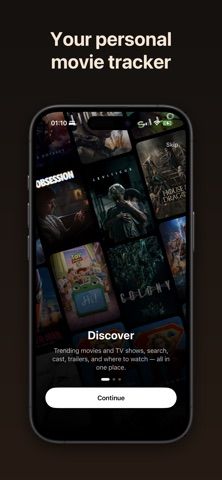
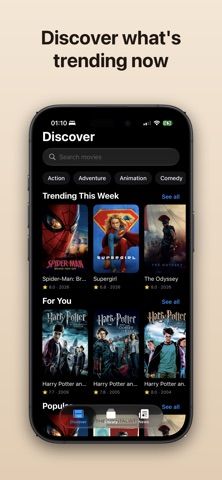
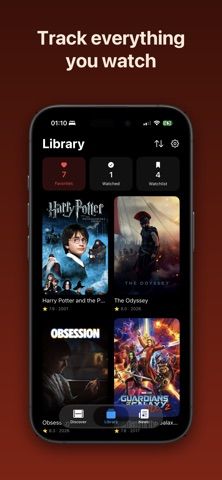
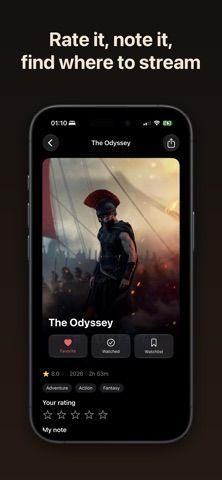
Choose with confidence
The useful details.
What it does
- Browse trending movies and shows or search for a specific title, cast member, or genre.
- Maintain a watchlist and viewing history with ratings and personal notes.
- Check cast, trailers, episode summaries, release dates, and streaming availability.
- Organize seasons and franchises, then use widgets and release-day reminders to keep up.
A good fit for
- Viewers who want a personal movie and TV log synced through their Apple devices.
- People who prefer a private watchlist with notes and streaming details over a public social feed.
Worth knowing
- Requires iOS 18 or later; syncing uses the user’s iCloud account. The listing does not describe a separate Android app.
- The App Store listing says Cinemate is free, with no ads or in-app purchases.
Frequently asked questions
Answers based on the app’s official listing and reviewed information.
What is Cinemate Movie Tracker used for?
Cinemate is a personal watch diary for movies and TV, with ratings, watchlists, streaming availability and release reminders.
What can you do with Cinemate Movie Tracker?
Browse trending movies and shows or search for a specific title, cast member, or genre. Maintain a watchlist and viewing history with ratings and personal notes. Check cast, trailers, episode summaries, release dates, and streaming availability. Organize seasons and franchises, then use widgets and release-day reminders to keep up.
Who is Cinemate Movie Tracker designed for?
Viewers who want a personal movie and TV log synced through their Apple devices. People who prefer a private watchlist with notes and streaming details over a public social feed.
What should you know before downloading Cinemate Movie Tracker?
Requires iOS 18 or later; syncing uses the user’s iCloud account. The listing does not describe a separate Android app. The App Store listing says Cinemate is free, with no ads or in-app purchases.
What does Cinemate Movie Tracker cost?
Free to download. Free to download and use; no ads, subscriptions, or in-app purchases are listed.
Which platforms support Cinemate Movie Tracker?
Greatooly's reviewed app information lists iOS, macOS.
Researched from official sources; this is not a hands-on review. Last checked 2026-11-10.
Keep exploring
More apps that might be a good fit.

Scaena: TV & Movie Tracker
Scaena tracks TV, movie and anime watch histories with release calendars, lists, notifications, widgets and optional Simkl sync.

Hardcopy: Movie Tracker
Hardcopy catalogs physical movie discs with barcode scanning, shelf locations, owned and wanted lists, and a random film picker.

Help Me Binge: TV Show Tracker
Help Me Binge tracks TV episodes, movies and sports, finds streaming options, and highlights subscriptions you may not be using.