
Calenduo is a shared calendar for people coordinating plans across a household, couple, or small team. Create a calendar and invite others so updates appear for every member, then switch between monthly, weekly, and daily views. Events can be entered in natural language, repeated on flexible schedules, and surfaced through push reminders and a daily summary. Calenduo also imports Google or device calendars, exports events as .ics files, and supports offline viewing with automatic synchronization when connected. Its current listing includes regional public and school holidays. The app is free to download and the US App Store listing does not show in-app purchases. It requires iOS 15 or later on iPhone or iPad. Location sharing and SOS are optional features that need location access, and Apple’s privacy label says the app may handle location, contact details, user content, and identifiers for functionality.

Calenduo: AI Shared Calendar
Calenduo combines shared family and team calendars with AI event entry, reminders, holiday views, location sharing, and .ics export.
Overview
A closer look at Calenduo: AI Shared Calendar.
A closer look
App screenshots
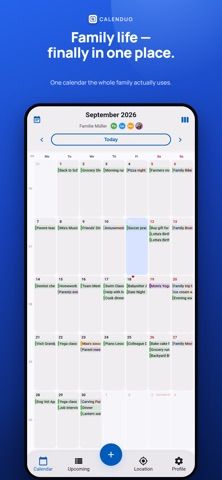
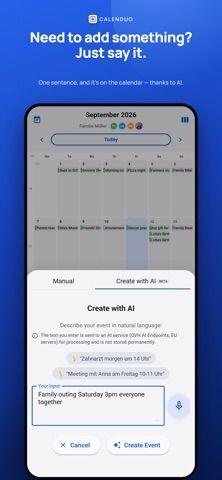
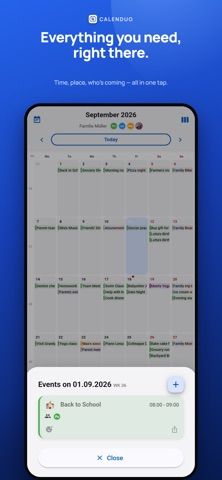

Choose with confidence
The useful details.
What it does
- Create shared calendars and invite family, friends, or coworkers to see changes as they happen.
- Add events by describing them in natural language, with repeat rules and push reminders.
- Import Google or device calendars, export events as .ics, and use calendar data offline.
- View public and school holidays for supported regions, and optionally share live location or send an SOS.
A good fit for
- Families, couples, and small teams coordinating appointments in one shared calendar.
- People who need calendar import and export alongside reminders and recurring events.
Worth knowing
- Requires iOS 15 or later on iPhone or iPad; the listing does not describe Android or web apps.
- Location sharing and SOS require location permissions and a network connection.
- The App Store privacy label says contact details, location, user content, and identifiers may be linked to the user.
Frequently asked questions
Answers based on the app’s official listing and reviewed information.
What is Calenduo: AI Shared Calendar used for?
Calenduo combines shared family and team calendars with AI event entry, reminders, holiday views, location sharing, and .ics export.
What can you do with Calenduo: AI Shared Calendar?
Create shared calendars and invite family, friends, or coworkers to see changes as they happen. Add events by describing them in natural language, with repeat rules and push reminders. Import Google or device calendars, export events as .ics, and use calendar data offline. View public and school holidays for supported regions, and optionally share live location or send an SOS.
Who is Calenduo: AI Shared Calendar designed for?
Families, couples, and small teams coordinating appointments in one shared calendar. People who need calendar import and export alongside reminders and recurring events.
What should you know before downloading Calenduo: AI Shared Calendar?
Requires iOS 15 or later on iPhone or iPad; the listing does not describe Android or web apps. Location sharing and SOS require location permissions and a network connection. The App Store privacy label says contact details, location, user content, and identifiers may be linked to the user.
What does Calenduo: AI Shared Calendar cost?
Free to download. Free to download; no in-app purchases are listed on the US App Store page.
Which platforms support Calenduo: AI Shared Calendar?
Greatooly's reviewed app information lists iOS.
Researched from official sources; this is not a hands-on review. Last checked 2026-11-10.
Keep exploring
More apps that might be a good fit.

CleanHaus: Airbnb Turnovers
CleanHaus automates short-term rental turnovers by connecting booking calendars with cleaners, schedules and property tasks.

GoalStar: Daily Goal Tracker
GoalStar makes daily goals visible with a gold-star chart, streaks, reminders, widgets and optional NFC tap tags.

Accessbox - Password Manager
Accessbox stores passwords, passkeys and verification codes in encrypted Accesscards with AutoFill, breach alerts and optional iCloud sync.