
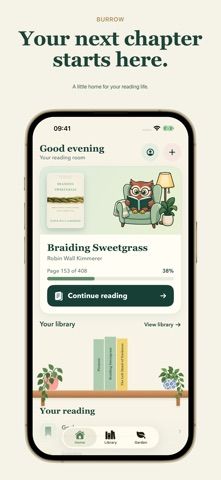
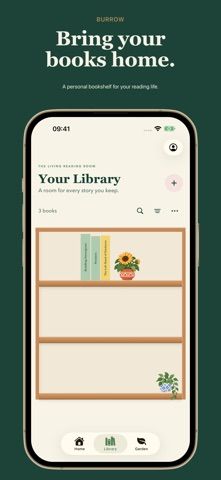
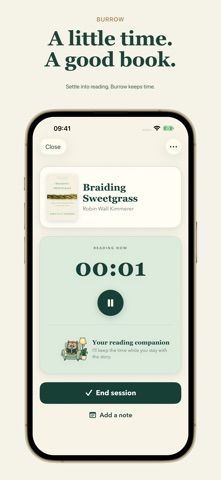
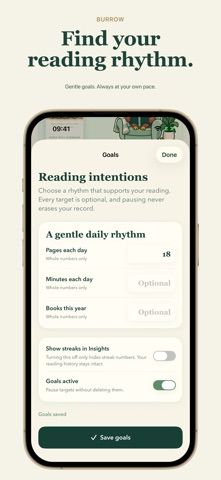
Burrow gives readers a place to organize books and record the time they spend with them. Users can build a personal library, track reading sessions and goals, review reading history, and keep notes, quotes, or reflections alongside each title. Books can be added by scanning a barcode or cover, photographing a bookshelf, searching a catalog, or entering details manually. The app also uses milestones to unlock keepsakes that can be placed on an illustrated shelf. Burrow tracks physical books, ebooks, and audiobooks but does not provide book files or audio playback. After previewing the library, full access requires a subscription or lifetime purchase, with prices shown before checkout.

ReadingBook cataloging appsBook club organizing appsBook lending tracking appsComic book cataloging appsQuote collecting apps
Burrow: Book & Reading Tracker
A reading tracker for cataloging books, logging reading sessions, saving notes, and collecting milestone keepsakes.
By Remarcable VC LtdReleased 2026/10/01No ratings yetOfficial store informationPublished 2026/11/04Checked 2026-11-04
Overview
A closer look at Burrow: Book & Reading Tracker.
A closer look
App screenshots
Choose with confidence
The useful details.
What it does
- Track books, reading time, goals, and progress across physical and digital titles.
- Add books by barcode, cover, bookshelf photo, catalog search, or manual entry.
- Save private notes, favorite quotes, and reflections with each book.
- Collect reading milestone keepsakes and arrange them on an illustrated bookshelf.
A good fit for
- Readers who want a visual book library with reading logs, notes, and milestone tracking.
Worth knowing
- The full reading experience requires paid access after the library preview; subscription or lifetime prices are shown in the app.
- Photo recognition needs an internet connection and may not identify every book or edition; Burrow does not provide ebooks or audiobook playback.
Frequently asked questions
Answers based on the app’s official listing and reviewed information.
What is Burrow: Book & Reading Tracker used for?
A reading tracker for cataloging books, logging reading sessions, saving notes, and collecting milestone keepsakes.
What can you do with Burrow: Book & Reading Tracker?
Track books, reading time, goals, and progress across physical and digital titles. Add books by barcode, cover, bookshelf photo, catalog search, or manual entry. Save private notes, favorite quotes, and reflections with each book. Collect reading milestone keepsakes and arrange them on an illustrated bookshelf.
Who is Burrow: Book & Reading Tracker designed for?
Readers who want a visual book library with reading logs, notes, and milestone tracking.
What should you know before downloading Burrow: Book & Reading Tracker?
The full reading experience requires paid access after the library preview; subscription or lifetime prices are shown in the app. Photo recognition needs an internet connection and may not identify every book or edition; Burrow does not provide ebooks or audiobook playback.
Does Burrow: Book & Reading Tracker include paid features?
Full access is available with an active subscription. Current plans and prices are shown on the purchase screen before confirmation. The listing also offers a lifetime purchase for full access; the current price is shown in the app before confirmation.
Which platforms support Burrow: Book & Reading Tracker?
Greatooly's reviewed app information lists iOS.
Researched from official sources; this is not a hands-on review. Last checked 2026-11-04.
Keep exploring
More apps that might be a good fit.

Reading Log XL — Book Tracker
Reading Log XL records reading time, pages, goals and streaks, organizes a three-shelf book list, and exports school-friendly reading reports.

MyBookShelf: Reading Log
MyBookShelf is a private reading catalog for scanning, organizing and tracking books, notes, ratings and reading progress.

Siftivo: What to Read Next
Siftivo suggests books from a reader’s taste and combines daily picks with reading shelves, reviews, reader follows, and a journal.