
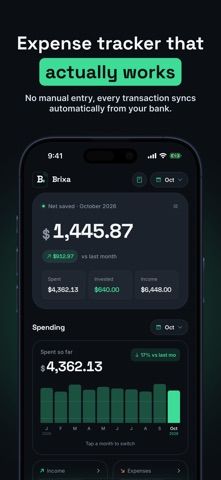
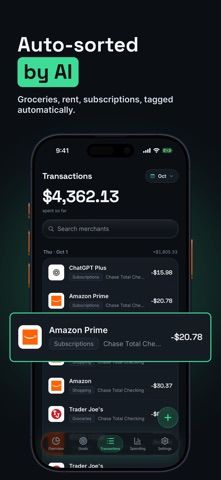
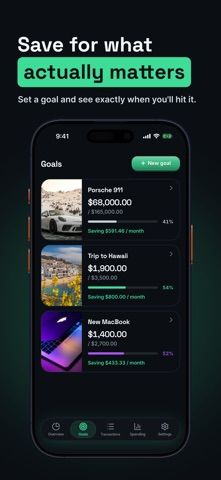
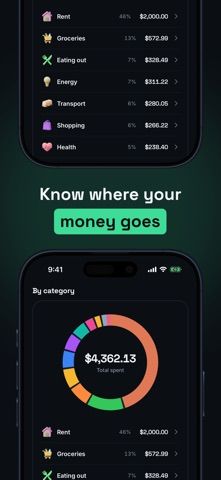
Brixa connects supported bank accounts and automatically organizes transactions into spending categories. The app presents balances and net worth across accounts and currencies, tracks a net-worth goal, and can flag recurring subscriptions. Users can edit categories so the system can learn their preferences. The listing says connections are read-only and run through Plaid, and that shared partner access is also read-only. Brixa requires a subscription, with a free trial for new subscribers; the listing does not show current prices or trial length. Because this service handles financial account information, review the Plaid connection, privacy policy, and subscription terms before connecting accounts. Categorization and currency conversion should be checked against bank statements.

Brixa: AI Expense Tracker
A bank-connected expense tracker that categorizes transactions and tracks net worth across currencies.
Overview
A closer look at Brixa: AI Expense Tracker.
A closer look
App screenshots
Choose with confidence
The useful details.
What it does
- Connect supported bank accounts through Plaid and view transactions in one place.
- Automatically categorize spending and refine categories through edits.
- Track net worth and goals across accounts and currencies.
- Review recurring charges and share a read-only spending view with a partner.
A good fit for
- People who want a consolidated view of bank-connected accounts and categorized spending.
Worth knowing
- Brixa requires a subscription; the listing does not state its price or the free-trial duration.
- Connecting accounts shares financial data with Brixa and its Plaid connection provider; review their privacy terms first.
- Verify automated categorization and currency conversions against original account records.
Frequently asked questions
Answers based on the app’s official listing and reviewed information.
What is Brixa: AI Expense Tracker used for?
A bank-connected expense tracker that categorizes transactions and tracks net worth across currencies.
What can you do with Brixa: AI Expense Tracker?
Connect supported bank accounts through Plaid and view transactions in one place. Automatically categorize spending and refine categories through edits. Track net worth and goals across accounts and currencies. Review recurring charges and share a read-only spending view with a partner.
Who is Brixa: AI Expense Tracker designed for?
People who want a consolidated view of bank-connected accounts and categorized spending.
What should you know before downloading Brixa: AI Expense Tracker?
Brixa requires a subscription; the listing does not state its price or the free-trial duration. Connecting accounts shares financial data with Brixa and its Plaid connection provider; review their privacy terms first. Verify automated categorization and currency conversions against original account records.
Does Brixa: AI Expense Tracker include paid features?
Brixa requires a subscription and offers a free trial to new subscribers. Check the purchase screen for the current price, trial length, and renewal terms.
Which platforms support Brixa: AI Expense Tracker?
Greatooly's reviewed app information lists iOS.
Researched from official sources; this is not a hands-on review. Last checked 2026-11-04.
Keep exploring
More apps that might be a good fit.

Jars: Savings Goal Tracker
Jars tracks user-entered savings goals, deposits, and withdrawal plans without holding or moving money.

Coal - Gift List & Budget
Budget for gifts by recipient and track each purchase through delivery, wrapping, and returns.

Budget Planner App: Tally
A personal budget app with voice expense entry, automatic category suggestions, spending limits, and charts.