
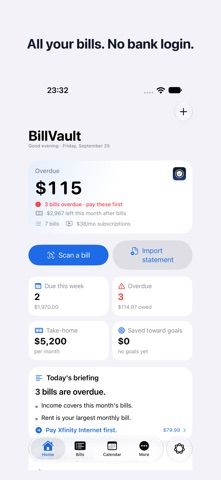
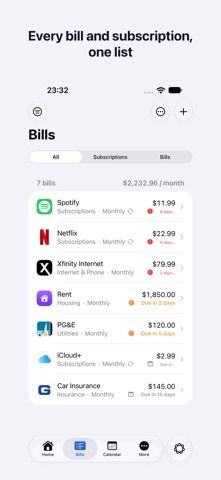
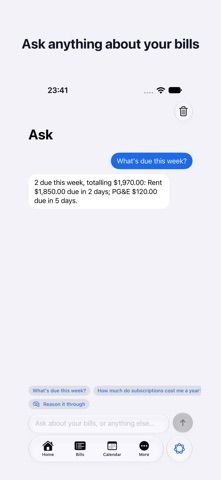
BillVault tracks bills, recurring subscriptions, and spending without requiring a bank login. Users can enter a bill by scanning a paper statement, pasting email text, or importing a statement file, then set due-date reminders and review what is safe to spend before payday. The app also organizes transactions, budgets, savings goals, and recurring charges, and can draft cancellation messages. The developer says scans and photos stay on-device and that no account or data sent to the developer is needed. Apple Intelligence features require supported hardware and operating-system versions. The free plan includes unlimited bill tracking and reminders; BillVault Pro adds scanning, statement import, net worth, and other tools through yearly or monthly subscriptions or a one-time purchase. New subscribers may receive a seven-day trial. Current prices appear in the App Store purchase section.

BillVault: Bill Tracker
A private bill tracker with due-date alerts, spending summaries, subscription checks, and Apple Intelligence.
Overview
A closer look at BillVault: Bill Tracker.
A closer look
App screenshots
Choose with confidence
The useful details.
What it does
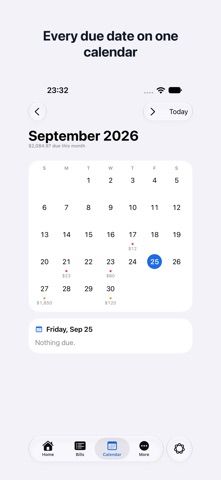
- Track bills and subscriptions with reminders before due dates and a calendar view.
- Scan paper bills, paste email details, or import a statement to organize charges.
- Review budgets, spending categories, savings goals, recurring charges, and safe-to-spend estimates.
- Use Apple Watch, widgets, Siri, and optional Apple Intelligence features on supported devices.
A good fit for
- People who want bill reminders and expense organization without connecting a bank account.
Worth knowing
- Statement import, unlimited scanning, net worth, and other tools require BillVault Pro.
- Some Apple Intelligence features require supported Apple hardware and software; check compatibility before purchase.
- Bill dates and balances should be checked against the original bill or account statement.
Frequently asked questions
Answers based on the app’s official listing and reviewed information.
What is BillVault: Bill Tracker used for?
A private bill tracker with due-date alerts, spending summaries, subscription checks, and Apple Intelligence.
What can you do with BillVault: Bill Tracker?
Track bills and subscriptions with reminders before due dates and a calendar view. Scan paper bills, paste email details, or import a statement to organize charges. Review budgets, spending categories, savings goals, recurring charges, and safe-to-spend estimates. Use Apple Watch, widgets, Siri, and optional Apple Intelligence features on supported devices.
Who is BillVault: Bill Tracker designed for?
People who want bill reminders and expense organization without connecting a bank account.
What should you know before downloading BillVault: Bill Tracker?
Statement import, unlimited scanning, net worth, and other tools require BillVault Pro. Some Apple Intelligence features require supported Apple hardware and software; check compatibility before purchase. Bill dates and balances should be checked against the original bill or account statement.
Does BillVault: Bill Tracker include paid features?
BillVault Pro is offered monthly or yearly, with a 7-day trial for new subscribers. Current regional prices are shown in the App Store. The listing also offers a one-time BillVault Pro purchase. Check the current price and included features in the App Store.
Which platforms support BillVault: Bill Tracker?
Greatooly's reviewed app information lists iOS.
Researched from official sources; this is not a hands-on review. Last checked 2026-11-04.
Keep exploring
More apps that might be a good fit.

Jars: Savings Goal Tracker
Jars tracks user-entered savings goals, deposits, and withdrawal plans without holding or moving money.

Coal - Gift List & Budget
Budget for gifts by recipient and track each purchase through delivery, wrapping, and returns.

Budget Planner App: Tally
A personal budget app with voice expense entry, automatic category suggestions, spending limits, and charts.