
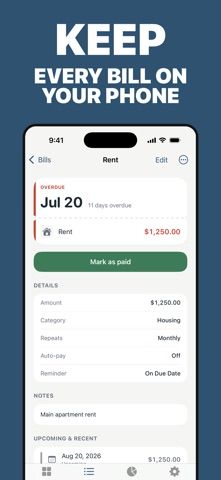
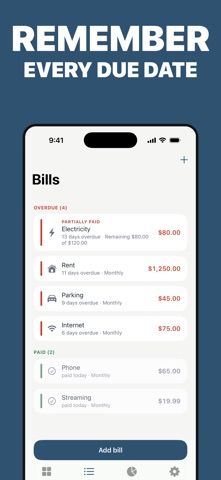
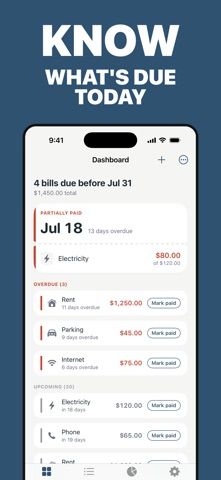
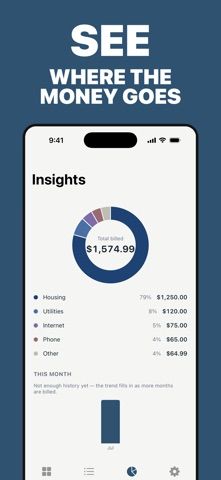
DueDay puts overdue, due-soon, and upcoming bills on one dashboard. Add one-time or recurring payments, set weekly, monthly, quarterly, or other schedules, receive reminders, and mark bills paid with a record of partial payments and remaining balances. The core bill tracker is free and has no limit on the number of bills. It works offline, keeps data on the device according to the listing, and does not ask for bank credentials or connect to financial accounts. Premium adds spending insights with category breakdowns and monthly trends. The current US App Store lists Premium at $3.99 monthly or $17.99 annually; the description also mentions a lifetime option, but no lifetime price appeared in the current purchase list. The listing says data is not collected. DueDay is for manual bill tracking, not automatic account aggregation.

Bill Organizer: DueDay
A private bill organizer for due dates, reminders, recurring payments, and payment history without bank linking.
Overview
A closer look at Bill Organizer: DueDay.
A closer look
App screenshots
Choose with confidence
The useful details.
What it does
- See overdue, due-soon, and upcoming bills on a single dashboard.
- Track one-time or recurring bills and set flexible payment schedules.
- Record full and partial payments, balances, and payment history.
- Use reminders and offline tracking without linking a bank account.
A good fit for
- People who want manual bill reminders and payment tracking without sharing bank credentials.
Worth knowing
- Bills must be entered manually; Premium is needed for category and monthly spending insights. The US App Store lists Premium at $3.99/month or $17.99/year.
Frequently asked questions
Answers based on the app’s official listing and reviewed information.
What is Bill Organizer: DueDay used for?
A private bill organizer for due dates, reminders, recurring payments, and payment history without bank linking.
What can you do with Bill Organizer: DueDay?
See overdue, due-soon, and upcoming bills on a single dashboard. Track one-time or recurring bills and set flexible payment schedules. Record full and partial payments, balances, and payment history. Use reminders and offline tracking without linking a bank account.
Who is Bill Organizer: DueDay designed for?
People who want manual bill reminders and payment tracking without sharing bank credentials.
What should you know before downloading Bill Organizer: DueDay?
Bills must be entered manually; Premium is needed for category and monthly spending insights. The US App Store lists Premium at $3.99/month or $17.99/year.
Does Bill Organizer: DueDay include paid features?
US App Store: Premium is listed at $3.99 monthly or $17.99 annually.
Which platforms support Bill Organizer: DueDay?
Greatooly's reviewed app information lists iOS.
Researched from official sources; this is not a hands-on review. Last checked 2026-11-04.
Keep exploring
More apps that might be a good fit.

Jars: Savings Goal Tracker
Jars tracks user-entered savings goals, deposits, and withdrawal plans without holding or moving money.

Coal - Gift List & Budget
Budget for gifts by recipient and track each purchase through delivery, wrapping, and returns.

Budget Planner App: Tally
A personal budget app with voice expense entry, automatic category suggestions, spending limits, and charts.