
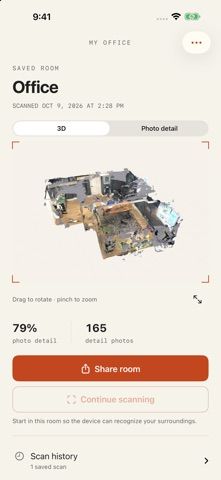
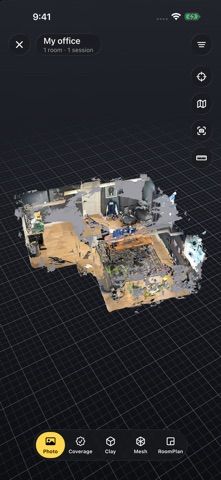
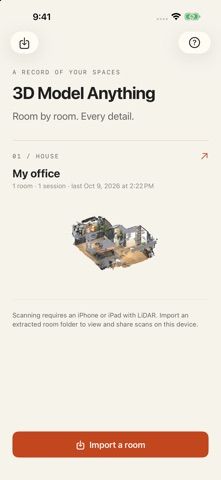
3D Model Anything records room scans on supported iPhone Pro and iPad Pro devices with LiDAR. It saves room layouts, 3D meshes, reference photos, and depth data, then lets users organize rooms into houses, review interactive previews, maintain scan history, and connect rooms through doorways. A room, scan session, or whole house can be exported as a ZIP through AirDrop or the iOS share sheet. The app is free, does not require an account, and keeps scans on the device unless the user shares them. Devices without LiDAR can still import and view existing scan folders. The listing cautions that scan quality varies and measurements are approximate; AI reconstruction is a separate desktop workflow, not a feature in the app.
3D Model Anything
A LiDAR room-scanning utility for capturing room layouts, meshes, reference photos, and depth data, then organizing and sharing scans.
By Wes BosReleased 2026/10/24App Store rating 5.0 (2)Official store informationPublished 2026/11/04Checked 2026-11-04
Overview
A closer look at 3D Model Anything.
A closer look
App screenshots
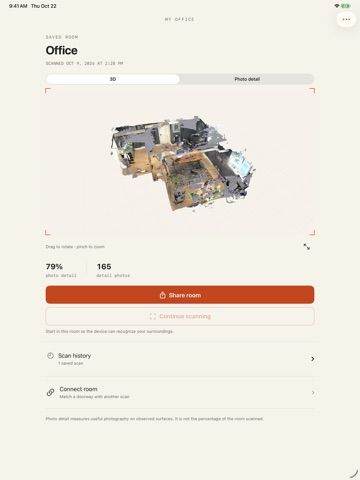
Choose with confidence
The useful details.
What it does
- Scan room layouts, meshes, reference photos, and depth data with LiDAR.
- Organize multiple rooms into houses and browse interactive previews.
- Connect scanned rooms and keep a scan history.
- Share room, session, or house archives through AirDrop or the iOS share sheet.
A good fit for
- People who want to document spaces and organize room scans directly on a supported Apple device.
Worth knowing
- Scanning requires a LiDAR-equipped iPhone Pro or iPad Pro and iOS/iPadOS 17 or later; measurements are approximate, and AI scene reconstruction happens separately on desktop.
Frequently asked questions
Answers based on the app’s official listing and reviewed information.
What is 3D Model Anything used for?
A LiDAR room-scanning utility for capturing room layouts, meshes, reference photos, and depth data, then organizing and sharing scans.
What can you do with 3D Model Anything?
Scan room layouts, meshes, reference photos, and depth data with LiDAR. Organize multiple rooms into houses and browse interactive previews. Connect scanned rooms and keep a scan history. Share room, session, or house archives through AirDrop or the iOS share sheet.
Who is 3D Model Anything designed for?
People who want to document spaces and organize room scans directly on a supported Apple device.
What should you know before downloading 3D Model Anything?
Scanning requires a LiDAR-equipped iPhone Pro or iPad Pro and iOS/iPadOS 17 or later; measurements are approximate, and AI scene reconstruction happens separately on desktop.
Does 3D Model Anything include paid features?
The reviewed listing reports no in-app purchases.
Which platforms support 3D Model Anything?
Greatooly's reviewed app information lists iOS.
Researched from official sources; this is not a hands-on review. Last checked 2026-11-04.
Keep exploring
More apps that might be a good fit.

CleanHaus: Airbnb Turnovers
CleanHaus automates short-term rental turnovers by connecting booking calendars with cleaners, schedules and property tasks.

GoalStar: Daily Goal Tracker
GoalStar makes daily goals visible with a gold-star chart, streaks, reminders, widgets and optional NFC tap tags.

Accessbox - Password Manager
Accessbox stores passwords, passkeys and verification codes in encrypted Accesscards with AutoFill, breach alerts and optional iCloud sync.